
Your AI Agent. On Your Desktop. Under Your Control.
One-click install. No Docker. No cloud. Studio for media creation. Codework for autonomous coding. Organization for multi-agent teams. Free forever.
Free for personal use. Windows, macOS, and Linux. 12 languages. ~300MB. Download page · All features
yes, it actually works
“
60+ year olds get it running in 5 minutes
User feedback
“
My 6 year old built a Snake game with it
Lio AI demo
“
Privacy-first communities love this
Analytics insight
- -$ git clone some-agent-repo
- -$ docker pull massive-image:latest
- -$ cp .env.example .env # good luck
- -$ docker-compose up -d # fingers crossed
- -# 2GB RAM just sitting there
- -# Weekend gone. Still not working.
Download
Click the installer. It just works.
Add Your API Key
Setup wizard - 30 seconds, choose language, add API key.
Start Doing Things
~300MB RAM. No Docker. No terminal. No weekend lost.
this takes 30 seconds
Everything you need. Nothing you don't.
A complete local AI agent without the infrastructure headache.
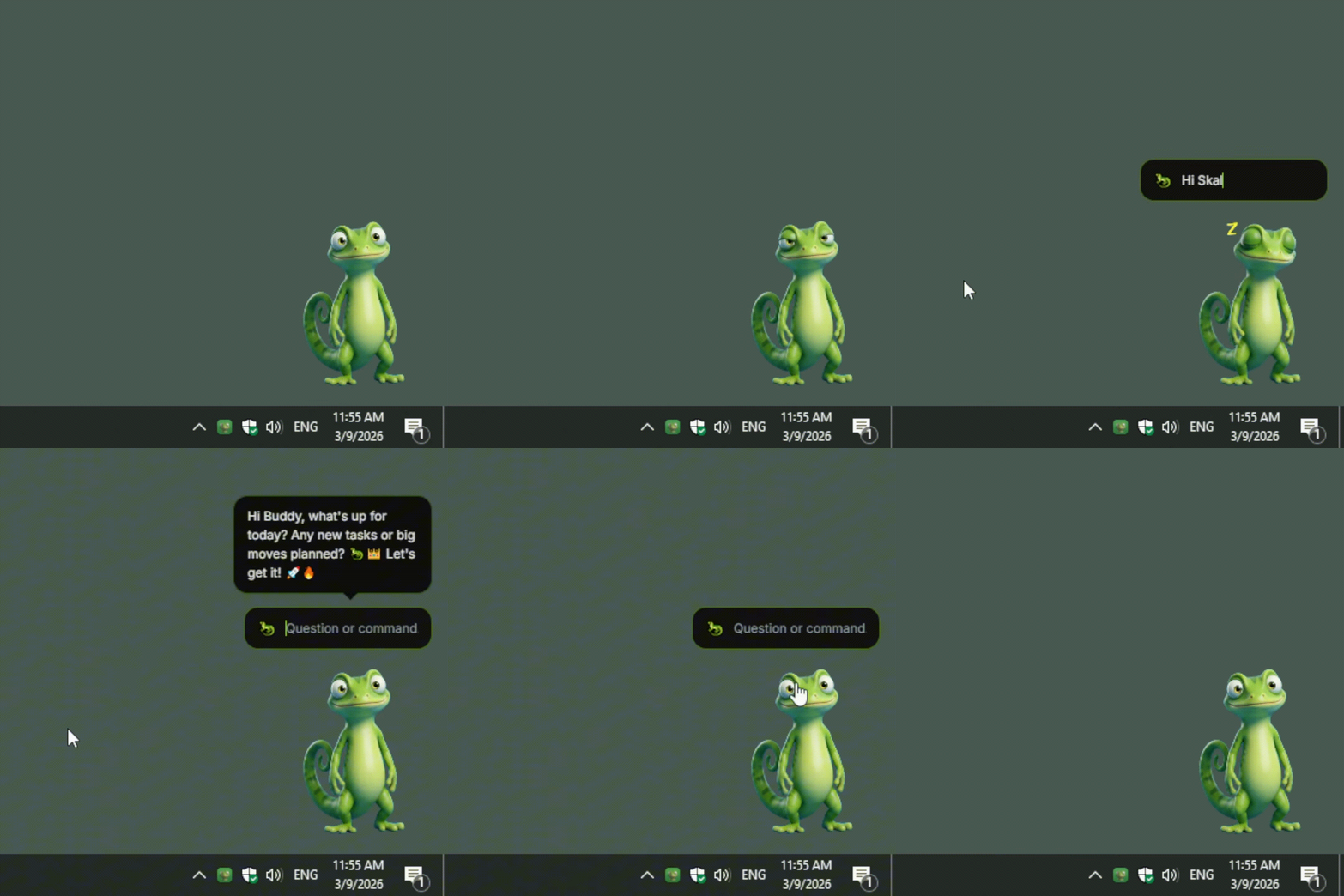
Desktop Buddy
Your AI companion lives on screen. Three skins: Gecko, Bubbles, Capybara. Proactively surfaces meetings, tasks, and emails. Click, describe, approve.
Skales Studio
Full media creation suite: AI image, video, voice, and music generation. 37 pre-built templates. Brand Kit for consistent output. Gallery + social export presets.
Codework
Autonomous coding agent. Point it at any project folder. it reads files, plans changes, writes code, and shows live diffs. Web search while coding.
Organization
Multi-agent teams. A CEO agent delegates to Marketing, Dev, and Research departments. Each agent runs tools autonomously with an approval UI before execution.
15+ AI Providers
OpenRouter, OpenAI, Anthropic, Google, Groq, Mistral, xAI, DeepSeek, Minimax, Perplexity, Replicate, Ollama, KoboldCpp, LM Studio, vLLM, and any OpenAI-compatible endpoint.
Spotlight
Cmd+Shift+S. Full tool access from anywhere. browser automation, skills, session search, file ops. Your system-level command palette.
Browser Playbooks
AI navigates, clicks, fills forms, and extracts data. Record a workflow once, replay it forever. Cookie auto-accept included.
Planner & AI Tasks
AI Day Planner with calendar integration. Schedule autonomous tasks daily, weekly, or via custom cron. Skales runs them while you sleep.
37 Templates
Pre-built templates across Studio, Codework, and Organization modules. Start creating images, videos, code projects, or agent teams in seconds.
Privacy by Design
Local-first. BYOK. Your data stays in ~/.skales-data. No server, no cloud sync, no account required. 12 languages in-app.
Meet the Desktop Buddy
Click the gecko, describe your task, approve the action. It lives on your screen.
Built for real people in real situations.
Not just developers. Not just tech enthusiasts.
ADHD & Focus
Break tasks into steps, set reminders, and have an AI that gently keeps you on track.
Learn more →Privacy & DSGVO
Run your AI completely offline. No GDPR concerns, no data leaving your machine.
Learn more →Kids & Coding
A safe, supervised environment where kids can learn to build things with AI.
Learn more →Small Business
Automate emails, manage calendars, draft documents - without paying per message.
Learn more →Up and running in under 2 minutes.
Download
Grab the installer for Windows or macOS from skales.app. No account, no email required.
Add Your API Key
Paste an OpenRouter, OpenAI, or any provider key. Or connect Ollama for fully offline use.
Start Doing Things
Chat, automate emails, browse the web, build code, manage your calendar. Skales handles it.
Bring your own AI. Or run one locally.
You choose your AI provider. You pay them directly. Skales never sees your API key on any server.
Your data. Your keys. Your choice.
Data stays local
Everything runs on your machine. No servers. No cloud. Your data never leaves your computer.
You own your API keys
Your keys stay in your .skales-data folder. Skales never transmits them to any server.
Choose your provider
Use OpenAI, Anthropic, Groq, run Ollama locally, or any OpenAI-compatible endpoint.
Ready to try a different kind of AI?
No sign-up. No subscription. No data collection. Just download and go.
Local AI for everyone 🦎